Cosmo Factory
Manage a 3D starship factory from the design office to liftoff.
- Developer
- GAMEFREEX
- Released
- Updated
- Game engine
- HTML5 (WebGL, three.js)
- Platforms
- Browser (desktop, mobile, tablet), installable app (PWA)
- Orientation
- Landscape
- Controls
- Keyboard, Mouse, Touch, Controller
- Multiplayer
- Yes, with friends: score race, up to 4 players
- Offline play
- Yes, once opened or saved with Download games for offline
- Price
- Free, no download, no sign-up
- Simulation8
- 3D20
- WebGL21
- Landscape11
- Keyboard54
- Mouse57
- Multiplayer53
Controls
Computer
- Click a contract to start it
- Click a bay to select it, then hire or upgrade
- Arrow keys switch views
Phone or tablet
- Tap a contract to start it
- Tap a bay to select it, then hire or upgrade
- Swipe to switch views
Controller
- Left stick or D-pad: move the cursor
- A: tap
- LB and RB: switch views
- B: drop the selected crew
- Start: pause
Cosmo Factory: how to play, tips and FAQ
Written by the GAMEFREEX team.
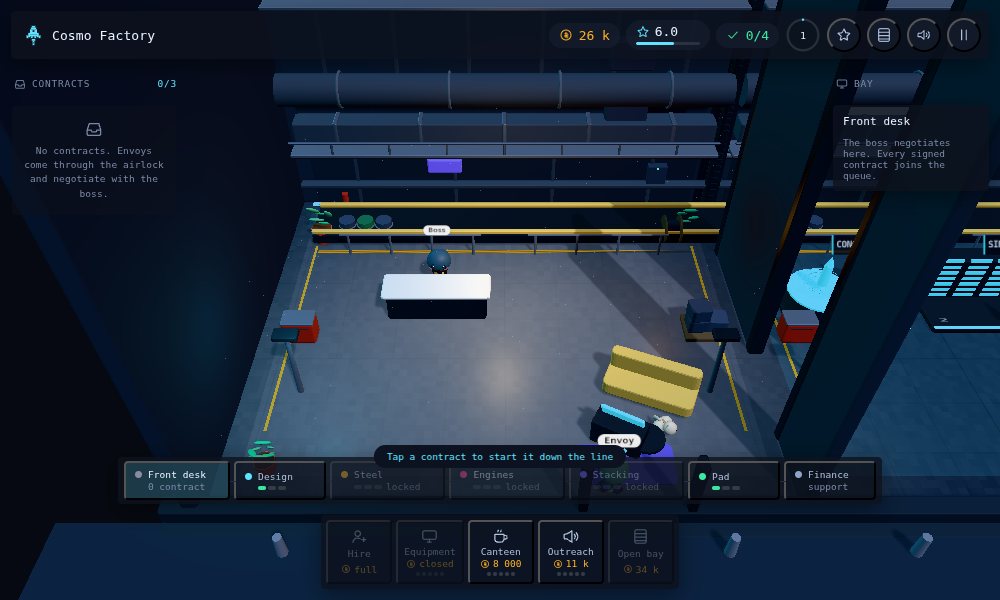
You run a starship factory, and the ships are absurd. Clients send contracts for Probes, Freighters, Cruise ships and Colony ships. Each accepted ship moves down a chain of rooms: the Design Office, the Steel Shop, the Engine Bay and the Stacking Bay, then the Launch Pad for fuelling, a static fire test and liftoff. The client pays at liftoff.
You start with 26,000 credits, a reputation of 6 out of 10 and 3 order slots. The Outreach upgrade raises that to 5. Every room needs a crew, and crews come as humans, aliens, robots, drones and AIs, at different costs: an AI costs almost twice a human's salary, a drone about two thirds. Salaries rise every day. Rent is charged per room in the chain. At the end of each day you pay both, and if your cash is negative after payroll, the run is over.
Events change the day. A Guild inspection doubles the reputation from each delivery for a minute, Eureka finishes a build on the spot, and a Debris strike damages the roof and lets critters loose.
- Resource management
- Prioritization
At a glance
- Run ends
- Cash below 0 after payroll, or reputation 0
- Day length
- 60 minutes of unpaused play
- Bays open at start
- Design Office and Launch Pad
- Open contracts
- 3, up to 5 with Outreach
- First launch
- About a minute in: the first 3 contracts are short starter jobs
- Saved
- Best score only
- Freex Coins
- 5 per new day, 3 per day at the end
How to play Cosmo Factory
- Tap a contract to start a new ship down the line. The first one arrives a few seconds after you power up the site.
- Follow the site plan in the corner: six short goals, from the first launch to opening the Steel Shop.
- Select a room to hire a crew or buy an upgrade. Hire from the front desk puts the new crew member in the first bay with a free station.
- Send tired crews to the coffee machine to restore energy.
- Switch views with the arrow keys or by swiping.
Controls, action by action
| Action | Computer | Phone or tablet |
|---|---|---|
| Start a contract | Click its card | Tap its card |
| Select a bay | Click the bay or its name in the line strip | Tap the bay or its name |
| Buy for the selected bay | Hire, Equipment, Canteen, Outreach, Open bay buttons | Same buttons in the dock |
| Send someone on a break | Select them, then their bay's coffee machine or Send on a break | Same, by tapping |
| Clear critters | Click the bug | Tap the bug |
| Move along the line | Left and Right arrows | Swipe left or right |
| Pause | Space or the pause button | Pause button |
What each purchase costs and does
Hiring costs 9,200 credits, 34% more for every crew member you already have, and each bay holds 3. The crew type is random, most often human, rarely an AI core. Equipment costs 9,000 per bay and 60% more per level, up to 5 levels of 10% speed each.
The Canteen (8,000, 5 levels) cuts energy loss by 13% per level. Outreach (11,000, 5 levels) adds 9% to contract values, brings contracts sooner and adds an open contract slot, up to 5. Opening a bay costs 34,000, then 57,800, then 98,260, in the order Steel Shop, Engine Bay, Stacking Bay, with 1 crew member hired for free.
In the Finance room, Costs (21,000, 4 levels) cuts payroll and rent by 8% per level.
Where a ship's price comes from
The length of the line multiplies every payout: x1 with 2 bays, x1.58 with 3, x2.16 with 4, x2.74 with all 5. Reputation adds up to x1.2 at 10 out of 10. Each delivery within 95 seconds of the previous one raises the combo by 14%, up to 6 steps, and a ship delivered with time to spare earns up to 30% more.
A Priority contract pays x1.8 with a 16% shorter deadline. The Rush contract event sends in one extra contract marked Rush that pays double the normal price with a deadline 40% shorter, and it arrives even when the contract list is full. Every delivery adds 0.3 reputation, 0.6 during a Guild inspection. A ship that misses its deadline costs 1 point and resets the combo, and a contract left in the list until its bar empties costs 0.7. The daily target is 4 ships on day 1 and pays 9,000 plus 2,600 per day number, plus 0.5 reputation.
Crew types and energy
Each crew member has a favorite ship type, shown next to their name. Humans work at 1.25 to 1.45 on it and 0.8 to 1.05 on the rest. Aliens swing widest, 1.2 to 1.6 against 0.6 to 1.1. Robots stay at 1.02 to 1.2 and tire at less than half a human's rate. Drones reach 1.5 but tire 50% faster. An AI core never tires.
Below 30 energy a worker runs at 55% speed, and at 0 at 32%. An idle worker under about 16 energy walks to the coffee machine on their own.
Tips to score higher
- Only accept contracts your line can finish. Missed deadlines cost reputation.
- The first three contracts of a site are short jobs that pay like a full ship, so the first launch comes about a minute in. Hire a second designer with that money: two ships can then sit in the Design Office at once.
- Find the slowest room and upgrade it first. Every ship behind it waits.
- The Finance room offers a loan of 62,000, paid back 28 percent higher over 10 days. It can save a bad week, but only one can run at a time.
Common mistakes
- Expecting to continue later. Only the best score is kept, so closing the page ends the run.
- Leaving contracts in the list as a buffer. Their timers run there too, and each one that expires costs 0.7 reputation. Reputation at 0 also ends the run.
- Waiting for contracts to pile up before hiring. A second designer pays for itself within a few ships, and the site plan points at the Hire button when you can afford it.
- Staying on 2 bays for too long. The third bay multiplies every ship by 1.58, while its rent is 2,400 credits a day.
- Taking a second loan to cover the first. Each new loan is 55% larger, and its daily repayment comes on top of payroll and rent.
Cosmo Factory FAQ
How do I lose?+
Ending a day with negative cash after salaries, rent and any loan repayment.
Is the factory saved?+
No. Every visit starts a new factory. Only your best score and the mute setting are kept on this device.