Bitling Rescue
Give tiny pixel creatures jobs and lead them across a 1-bit desktop, over 404 levels.
- Developer
- GAMEFREEX
- Released
- Updated
- Game engine
- HTML5
- Platforms
- Browser (desktop, mobile, tablet), installable app (PWA)
- Orientation
- Landscape
- Controls
- Mouse, Touch, Controller
- Multiplayer
- No, single player
- Offline play
- Yes, once opened or saved with Download games for offline
- Price
- Free, no download, no sign-up
- Puzzle16
- Landscape11
- Mouse57
Controls
Computer
- Pick a skill in the bottom bar
- Click a bitling to give it that job
- Use pause and fast-forward to plan
Phone or tablet
- Tap a skill in the bottom bar
- Tap a bitling to give it that job
- Pause and fast-forward from the bar
Controller
- Left stick or D-pad: move the cursor
- A: tap a bitling or a button
- X, Y, LB, RB: skills 1 to 4
- RT: fast forward
- Start: pause
Bitling Rescue: how to play, tips and FAQ
Written by the GAMEFREEX team.
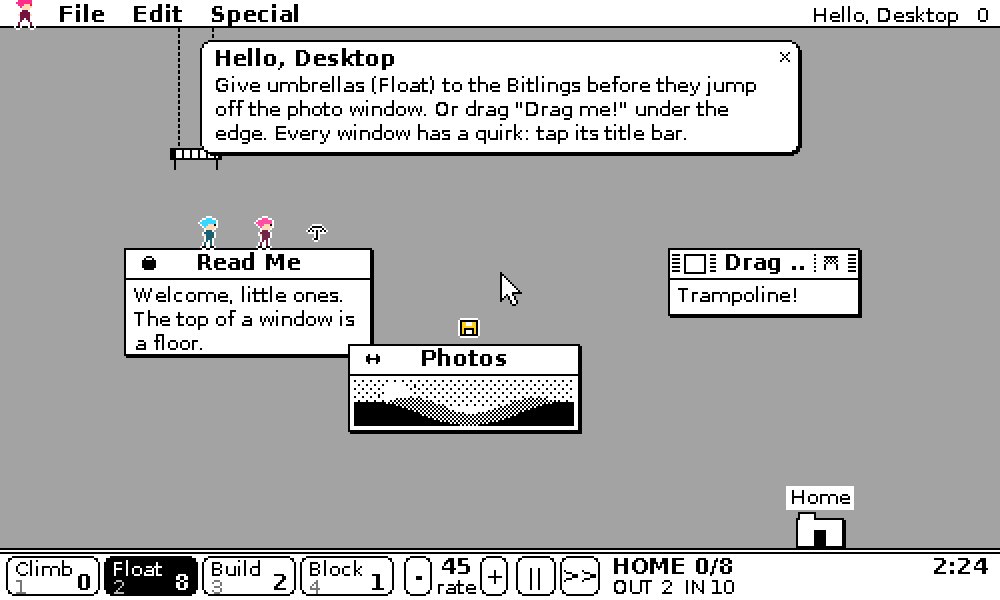
A retro black and white desktop, and tiny pixel creatures called Bitlings walking across it. Open windows are the floors. Bitlings walk in a straight line, turn around at walls, and will cheerfully walk off an edge or into the Trash. You get them to the Home folder by handing out jobs: Climber, Floater (an umbrella for long falls), Builder (a staircase across a gap) and Blocker (stands still and turns the crowd around).
Every window has a quirk, and you use it by dragging the window: some slide, some work like lifts. Clicking a title bar only shows what the quirk does. Tapping the body of an escalator flips its direction, and the Trash can be put to sleep for 20 seconds from the Special menu. The first level, Hello, Desktop, gives you 12 Bitlings, asks you to save 8, and allows 150 seconds.
There are 404 levels plus a daily challenge. The early ones are hand-made, with names like Shredder Gap, Trash Day and Pop-up Hell, and the last one, 404 Not Found, is hand-made too. Every level is guaranteed to have a solution.
- Problem solving
- Planning
- Timing
At a glance
- Levels
- 404, plus a daily challenge
- Chapters
- 8, of 50 levels each
- Deadly falls
- Onto the floor, over 62 px
- Stars
- Up to 3 per level
- Freex Coins
- 4 per new star
- Skins
- Unlocked at 150, 400, 800 stars
How to play Bitling Rescue
- Pick a skill in the bottom bar: Climb, Float, Build or Block.
- Click or tap a Bitling to give it that job.
- Drag a window to use its quirk. Clicking its title bar explains what the quirk does.
- Pause and fast-forward from the bar.
Controls, action by action
| Action | Computer | Phone or tablet |
|---|---|---|
| Pick a skill | Keys 1 to 4, or the bottom bar | Tap it in the bottom bar |
| Give the skill | Click a Bitling | Tap a Bitling |
| Release a Blocker | Click it again, with any skill | Tap it again |
| Move a window | Drag its title bar or body | Drag it |
| Read a window's quirk | Click its title bar without dragging | Tap its title bar |
| Close a pop-up | Click the box at the left of its title bar | Tap that box |
| Run an elevator | Drag its scroll bar | Drag its scroll bar |
| Release rate | + and - keys | Rate buttons in the bar |
| Pause, fast forward, restart | Space or P, F, R | Bar buttons, MENU to restart |
Every window quirk
Heavy windows follow you slowly but never drop anyone. A Slider moves only left and right, a Lift Rail only up and down. Rubber springs back 3 seconds after you let go. Limited locks after a few moves, usually 2. Magnet lines up level with a neighboring window when you drop it within 10 pixels of it.
A Trampoline bounces Bitlings back at 60% of their landing speed. Glass Floor shatters on the 6th Bitling step. An Escalator walks them its way 1.6 times faster, and tapping its body flips the direction. A Waiting Room holds each Bitling for 3 seconds. Pop-ups pay 25 points when closed, but clicking their body opens another one.
Pickups, tools and surprises
A Bitling walking over a pickup collects it: 25 points plus umbrella +2 Float, hard hat +2 Build, rope +2 Climb, stop sign +1 Block, coffee (everyone 1.6 times faster for 8 seconds), floppy +500 points, clock +20 seconds, heart +1 Undo or folder +1 New Folder. Undo brings the last lost Bitling back at the hatch, umbrella open. New Folder drops a small platform where you click.
Events arrive every 9 to 30 seconds. A virus bug eats Bitlings until you tap it (+100). A bomb blows up 5 seconds after landing unless you tap Restart (+150). Tap flying floppies (+50) before they knock Bitlings off. Low Gravity stops all splats for 7 seconds.
Stars and the difficulty curve
Each saved Bitling is worth 100 points, and a win adds 5 per second left. One star means you reached the target, 3 means you saved everyone, and 2 needs the target plus half of the spare Bitlings, rounded up.
Levels 7 to 403 are generated and add one idea at a time: gaps and the shredding floor from level 12, a crowd heading the wrong way from 17, walls from 22, the Trash from 27, elevators from 32, gaps crossed with the Magnet window from 47, Escalator detours from 70, and two twists at once from 180.
Tips to score higher
- Pause at the start of every level and read the whole route before giving any job.
- Put a Blocker down early to hold the crowd while you prepare the path.
- The umbrella (Float) can be given in mid-air, so a Bitling that has already slipped off an edge can still be saved.
Common mistakes
- Writing off a falling Bitling. Float works in mid-air, and only a drop of more than 62 pixels onto the floor kills.
- Leaving a Blocker in place. It never goes Home, so the level runs out the clock and loses its time bonus. Click it with any skill to set it walking, at no cost.
- Sending 1 Builder at a wide gap. A Builder lays only 12 steps, so a wide gap needs a second one starting where the first staircase ends.
- Raising the release rate early. At the top a Bitling drops every 0.5 seconds, and you cannot go back below the level's own rate.
Bitling Rescue FAQ
Is every level solvable?+
Yes. Every level is checked to have a solution with the skills and quirks it gives you.
What are stars for?+
Better rescues earn more stars, and stars unlock skins for your Bitlings.