Flower Freex
Tap to hop through spinning shapes, but only where the color matches your ball.
- Developer
- GAMEFREEX
- Released
- Updated
- Game engine
- HTML5
- Platforms
- Browser (desktop, mobile, tablet), installable app (PWA)
- Orientation
- Portrait
- Controls
- Keyboard, Mouse, Touch, Controller
- Multiplayer
- Yes, with friends: score race, up to 4 players
- Offline play
- Yes, once opened or saved with Download games for offline
- Price
- Free, no download, no sign-up
- Arcade25
- Portrait53
- Keyboard54
- Mouse57
- Multiplayer53
Controls
Computer
- Click or press Space to jump
Phone or tablet
- Tap anywhere to jump
Controller
- A or B: jump
- Start: pause
Flower Freex: how to play, tips and FAQ
Written by the GAMEFREEX team.
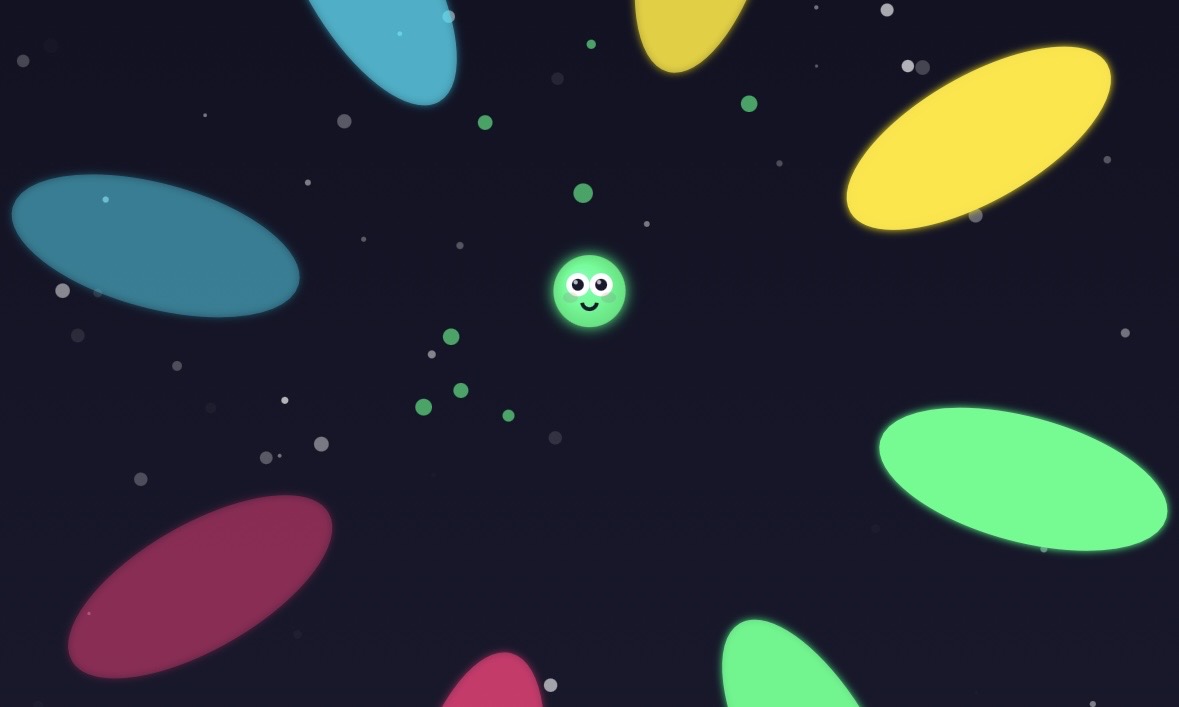
One tap, one hop, and a ball that may only pass through the slice of an obstacle that matches its own color. That is the whole rule set of Flower Freex. The ball comes in four colors (pink, cyan, yellow, green), every obstacle is painted in the same four, and color switchers along the shaft change your ball to a random new one.
The first flowers are plain circles turning slowly. New shapes join as you cross more of them: a diamond after 3, a square after 5, the octagon after 10, a line gate after 12, a star after 15, a triangle after 17 and a crescent after 20. Rotation speeds up a little with every flower until the 35th. From the 40th, obstacles can reverse their spin without warning, and that is where most runs end.
- Timing
- Color recognition
At a glance
- Game ends
- After 3 lost lives
- Lives
- 3
- Obstacle shapes
- 11, unlocked over the first 20 flowers
- Spin speed
- Rises smoothly over the first 35 flowers
- Power-up bubbles
- 1 chance in 5 per section
- After a lost life
- About 2 s without collisions
How to play Flower Freex
- Click the game area or tap the screen to make the ball hop upward.
- Pass through an obstacle only where its color matches your ball.
- Touch a color switcher to get a new ball color.
- Pick up stars, coins and power-up bubbles on the way.
- Hitting the wrong color, or falling off the bottom of the screen, costs one of your three lives.
- When the game is paused, tap the pause screen to carry on.
Controls, action by action
| Action | Computer | Phone or tablet |
|---|---|---|
| Hop | Click the game area | Tap the screen |
| Pause or restart | Buttons in the top bar | Buttons in the top bar |
| Resume | Click the pause screen or the play button | Tap the pause screen or the play button |
What sits between two obstacles
The shaft is built from 1,400 pixel sections with the same layout. Going up from one obstacle, you meet a power-up bubble (1 time in 5), a color switcher, a star and a trail of 3 to 5 coins, then the next obstacle. Everything sits on the center line and the ball never moves sideways, so you pick all of it up.
So the color you hold at an obstacle is always the one the switcher right below it gave you. A switcher always changes your color to one of the three others, chosen at random when you touch it.
Passing an obstacle, a star and a coin are each worth 1 point, and BOOM adds 2 per obstacle it destroys. New shapes and faster spin follow the number of flowers you have crossed, not the score, so picking up coins never brings the harder obstacles sooner.
How collisions work
Only a thin ring at the base of the petals is solid. The petals that grow out of it are decoration, and the ball can pass through their tips in any color. The hitbox of the ball is a little smaller than the ball you see, and a touch within a few pixels of a slice in your own color does not count. Petals in your own color blink, which is the fastest way to find your slice.
A circle is crossed twice: on the way in at the bottom and on the way out at the top. The slice at the top is two colors away from the slice at the bottom, so after you enter you usually wait inside for your color to turn round. Not every shape splits colors evenly: the pentagon and the star have two pink sections, the hexagon two pink and two cyan, and the crescent keeps green on a short inner arc.
The diamond joins after 3 flowers, the square after 5, the plus after 6, the pentagon after 8, the octagon after 10, the line gate after 12, the hexagon after 13, the star after 15, the triangle after 17 and the crescent after 20. Each obstacle is picked at random from the unlocked shapes, so circles keep coming all game. From the 40th flower on, obstacles turn back for 2 to 3 seconds after every 5 to 8 seconds of spin, so they still come all the way round.
The line gate is a hedge of petals across the shaft with an opening that slides left and right. Its two sides take opposite colors that change as it turns: go through the opening, or through the side that matches your ball.
When you play alone and lose a life, the flowers turn 12 percent slower for a while (two lost lives in a row: 24 percent). The help wears off by one step every 4 flowers you cross. Two runs in a row that end before the 5th flower start the next one with the first step. Score races and party rounds never get this help, so everyone plays the same game.
Power-ups and hops in numbers
The game runs at 60 steps a second on every screen, so a 120 or 144 Hz screen no longer makes it faster. Shield, Slow-Mo and Magnet last about 5 seconds, x2 Score about 8. Slow-Mo cuts rotation to 40 percent but leaves gravity and your hop unchanged. x2 Score also doubles stars, coins and BOOM points. Magnet pulls stars in from 200 pixels away and triples the pick-up range for coins.
Each tap sets the same upward speed rather than adding to it, and one hop rises about 94 pixels. After a wrong-color hit the ball bounces up from where it was; after a fall it reappears at its usual height with a free hop.
Tips to score higher
- Hover under an obstacle with small, regular taps and wait for your color to rotate into the gap. Gravity is light, so short taps keep you almost in place.
- Look past each switcher before you touch it. The color it gives you decides which slice of the next obstacle you need.
- Past the 40th flower, never commit based on how fast a gap was moving a second ago. Wait until you see which way it is turning now.
Common mistakes
- Counting on the shield near the bottom of the screen. It only blocks wrong-color hits, and falling off the bottom still costs a life.
- Tapping in bursts to get out of a closing gap. A tap resets your upward speed instead of adding to it, so two taps a split second apart climb barely higher than one.
- Trying to avoid a color switcher. The ball cannot move sideways and the switcher is on its path, so expect a new color after every obstacle.
Flower Freex FAQ
I was the right color and still lost a life. Why?+
The game checks the band you touch at each step. A graze within a few pixels of your own color is forgiven, but if a neighboring color slides fully into you mid-hop, it counts as a hit. Go when your color is centered in the gap, not when it first appears.
What does each power-up do?+
Shield protects you for a few seconds, Slow-Mo slows the rotation, x2 Score doubles points, Magnet pulls stars toward you and BOOM destroys every obstacle on screen.